AI Medical Scribe

A better visit starts with less note-taking.

Turn natural doctor-patient conversations into structured clinical notes that are ready for clinician review when the visit ends.

Clinician review stays in the workflow.
96Meridian.ai Medical ScribeFictional example
John DoeSample visit · Internal MedicineDraft ready for review
Conversation00:48
Doctor

What brings you in today?

Patient

I’ve had a dry cough and a stuffy nose for three days.

Doctor

Any fever or trouble breathing?

Clinical noteDraft
Chief complaint

Dry cough and nasal congestion for three days.

History of present illness

Symptoms are worse at night. No fever or shortness of breath reported.

Assessment & plan

Review symptoms, supportive care, and follow-up precautions.

01Capture the visit

Keep attention on the conversation.

02Review the draft

See organized clinical sections.

03Complete the note

Choose the review and EMR handoff path.

A closer look

From conversation to clinical documentation.

Every step is designed to help clinicians get to a useful first draft faster, while keeping them in control of what becomes part of the record.

01 / Capture

Structured clinical notes

Start with the visit, not a blank page.

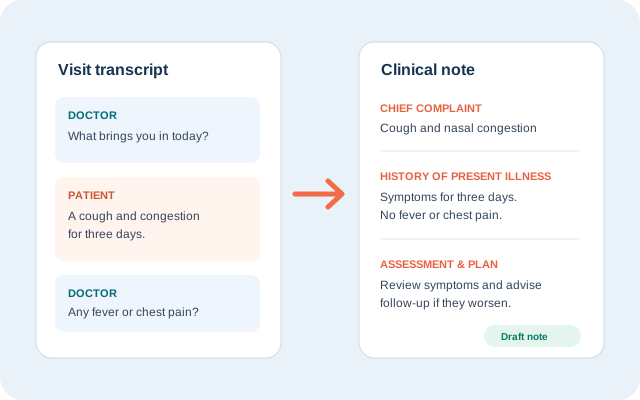
The conversation becomes a draft organized into familiar clinical sections such as chief complaint, history, assessment, and plan. Clinicians can compare the draft with the source conversation and refine it before completion.

  • Clear, scannable sections
  • Conversation context retained
  • Ready for clinician review
Doctor and patient transcript arranged beside a structured draft clinical note
From spoken visit to organized note
02 / Connect

EMR Sync

Choose where your team finishes the note.

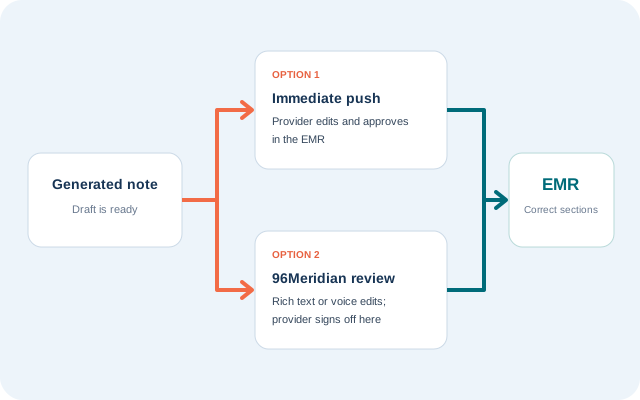
Send a generated draft for review in the EMR, or let providers edit and sign off in 96Meridian before the note is copied into the appropriate EMR sections.

Review in your EMRSend the draft, then edit and approve there.
Review in 96MeridianRefine the note here, then sign off and sync.
Explore EMR handoff
Two clinical note handoff options leading to the EMR
Two ways to complete the documentation
03 / Adapt

Flexible note templates

Documentation that fits the visit.

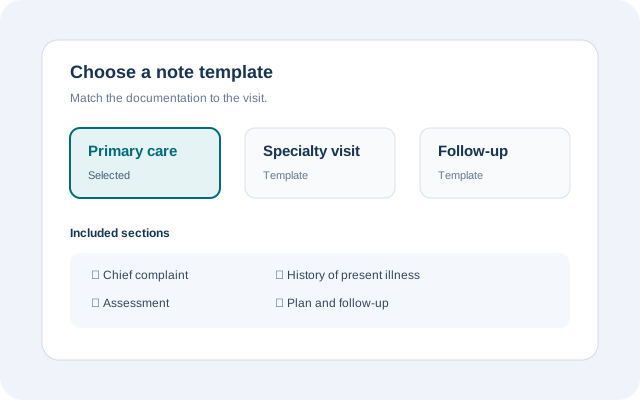
Choose templates aligned with specialties and visit types. Consistent headings make notes easier to review while leaving room for the provider to add the nuance that matters.

  • Specialty-aware structure
  • Consistent note headings
  • Room for provider edits
Medical scribe interface showing selectable primary care, specialty, and follow-up note templates
Templates for different clinical workflows
04 / Assist

ICD-10 suggestions

Relevant coding context, beside the note.

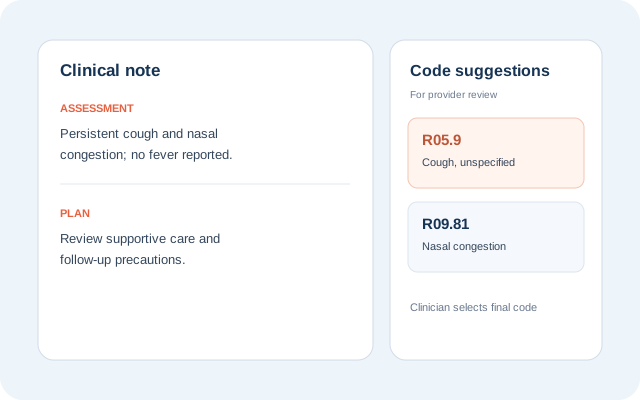
Potential codes appear next to the documentation so clinicians can assess them in context. Suggestions support the review process; the provider makes the final diagnosis and coding choice.

  • Suggestions beside the note
  • Clinical context visible
  • Provider makes the final choice
Draft clinical note shown beside ICD-10 code suggestions for provider review
Suggestions stay in the review context
05 / Understand

Multilingual conversations

Make more conversations easier to document.

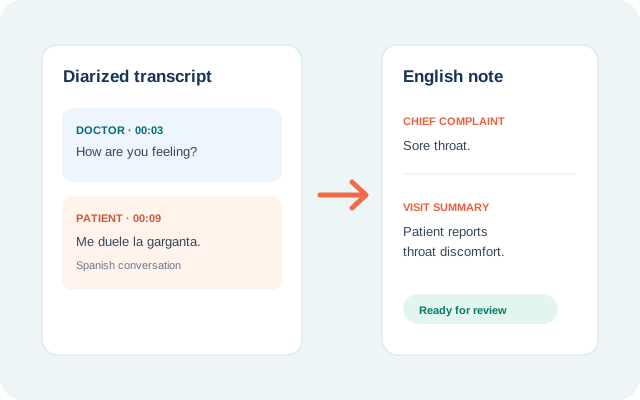
Conversations in more than 90 languages can be turned into English clinical notes. Speaker labels in the transcript help clinicians verify who said what and review the resulting draft.

  • 90+ supported languages
  • Doctor and patient speaker labels
  • English clinical draft
Spanish patient conversation and diarized transcript becoming an English draft note
Language support without losing speaker context
06 / Approve

Provider review

The clinician has the final word.

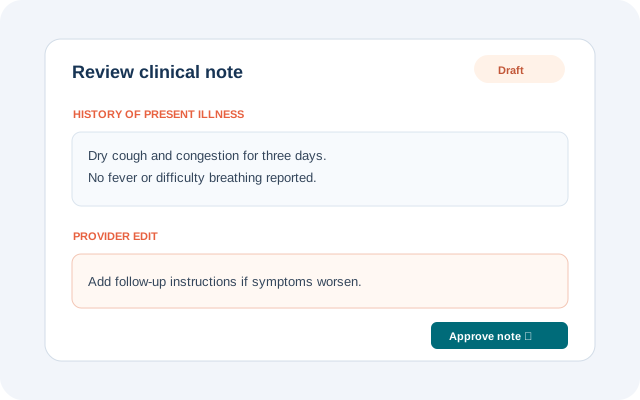
Review the draft against the transcript, edit wording or clinical details, and confirm that the final note accurately reflects the encounter before it is approved.

  • Review against the transcript
  • Edit before approval
  • Clinician-controlled final note
Clinician reviewing and editing a draft clinical note before approval
Human review before the note is final

Common questions

How the AI medical scribe fits into care.

Does the clinician review the note?

Yes. The scribe produces a draft for clinician review. Providers can compare it with the conversation, make edits, and approve the final documentation.

Can notes use specialty-specific templates?

Templates can be selected to match specialties and visit types, with consistent sections and space for the provider to add details.

How does the note reach the EMR?

Teams can send a draft for review in the EMR or finish the review and sign-off in 96Meridian before copying it to the mapped EMR sections, depending on the configured workflow.

See it in action

Give the conversation your attention. We'll help with the draft.

Talk with our team about a medical scribe workflow that fits your clinicians and your EMR.

Book a Demo